Colour Space is a method of defining colours using a numerical
system. There's lots of crazy colour spaces out there, but
lets stick with the ones you are most likely to run across.
RGB
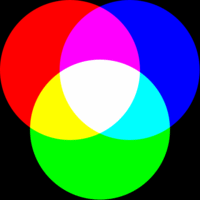 RGB stands for Red, Green and Blue, which are the three primary
addative colours.
Addative colours are used when working with light, such as in your
computer monitor or TV. A blank screen is black and colours
are added to produce an image.
Different intensity combinations of these three colours can produce all
the other colours of the rainbow. When all three primary
colours are at the same intensity, the result is a shade of
grey.
RGB stands for Red, Green and Blue, which are the three primary
addative colours.
Addative colours are used when working with light, such as in your
computer monitor or TV. A blank screen is black and colours
are added to produce an image.
Different intensity combinations of these three colours can produce all
the other colours of the rainbow. When all three primary
colours are at the same intensity, the result is a shade of
grey.
Hey! Wasn't I told in school that the three primary colours
were Red, Green and Yellow? Those are the three primary
SUBTRACTIVE colours. Also, the exact colours are actually
Cyan, Magenta and Yellow. See CYMK below.
CMYK
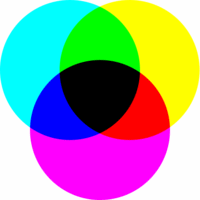 CMYK stands for Cyan, Magenta, Yellow and Black. These are
the primary subtractive colours. I don't have a clue why the
letter K represents black, but my guess is that they didn't want to use
B for black in case you confuse it with B for blue in RGB space.
These are refered to as subtractive colours because they are used for
pigments, such as those you find in a printer. A blank page
starts off as white (all the colours of the rainbow) and pigments are
applied to subtract the unwanted colours.
CYMK is mostly used in pre-press aplication and you probably won't come
across it too often in the corse of movie making (except when you're
printing DVD lables of your latest flick:)
CMYK stands for Cyan, Magenta, Yellow and Black. These are
the primary subtractive colours. I don't have a clue why the
letter K represents black, but my guess is that they didn't want to use
B for black in case you confuse it with B for blue in RGB space.
These are refered to as subtractive colours because they are used for
pigments, such as those you find in a printer. A blank page
starts off as white (all the colours of the rainbow) and pigments are
applied to subtract the unwanted colours.
CYMK is mostly used in pre-press aplication and you probably won't come
across it too often in the corse of movie making (except when you're
printing DVD lables of your latest flick:)
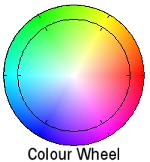 An interesting thing to note is that RGB and CMY are the opposite of
each other. An interesting thing to note is that RGB and CMY are the opposite of
each other.
You can see this on a colour wheel where: Red is
across from Cyan, Green is across from Magenta and Blue is across from
Yellow.
This is a handy thing to know when it comes to colour
correcting an image. For example, if your image is too
yellow, it can be cancled out by adding blue (the opposite
colour). And it follows that green counteracts magenta, and
red counteracts cyan.
HLS
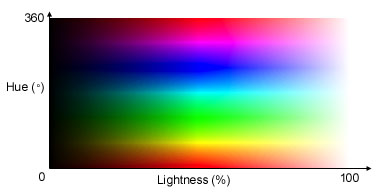
HLS stands for Hue, Luminance and Saturation. Sometimes the
last two letters are swapped (HSL), but it means the exact same thing.
I can't think of a file format that saves images in HLS space, but you
often find it available in most painting programs, because it's very easy
for people to think in terms of HLS.
You can see how it's simple enough to pick a colour (Hue) and then
modify it to the shade (luminance) and saturation you desire.
Easy peasy.
YUV
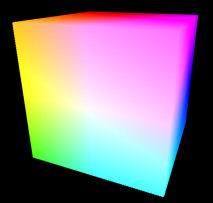 Okay, this colour space is harder to wrap your brain around, but it is
found in most digital video formats (including MiniDV) so it's worth
understanding. Okay, this colour space is harder to wrap your brain around, but it is
found in most digital video formats (including MiniDV) so it's worth
understanding.
First of all, I don't know why they use the letters Y, U, V (must be
some big brain scientific reason). It's (a bit) easier if you
think of it as Luma, -Red, -Blue (denoted as L,-R,-B). So
excuse me, all you notational purists out there while I continue to use
L,-R,-B to explain how YUV works...
L,-R,-B capitalizes on a weakness of human visual perception in order
to reduce the amount of data used to create an image and
still give the PERCEPTION of no data loss. The trick is to
save less colour information than you do luminance (brightness)
information. The human eye is more sensitive to luminance
than it is to chrominance so you can get away with throwing some of it
out.
This is done by “sub-sampling” the colour
information. This means that the colour information is
captured at a lower resolution than the luminance
information. The sub-sampling ratio is often denoted as 4:2:2
or 4:1:1. This mean for every 4 pixes of luminance info,
there are only 2 (or 1) pixels of colour info. For example: Suppose you have a picture that is 100 by 100
pixels in size. With 4:2:2 encoding, the luminance of the
image is saved at a resolution of 100x100, but the colour info (both
-Red and -Blue) is saved at a resolution of 50x100. In the
case of 4:1:1 encoding, the luminance is still at 100x100, but the
colour is sampled at 25x100.
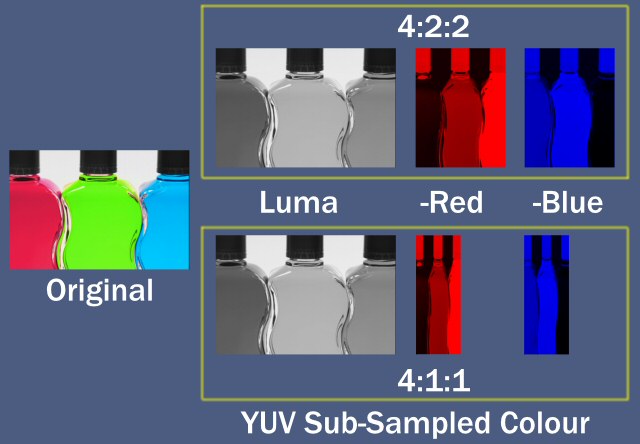
Of course, before the image is actually displayed, the colour info
needs to be scaled up to match the resolution of the luma info.
But where is the colour Green in all of this? Well, it works
like this...
The luma info is a grey scale (black & white) image.
White is made up of ALL the colours of the rainbow. So if you
start with white and then subtract red (-R) and subtract blue (-B),
what you're left with is green. Neat, huh?
This also takes advantage of another attribute of human
perception. Our eye's are more sensitive to green than to
other colours. In L,-R,-B colour space, green is what is left
of the luminance (after red and blue are subtracted) and since the
luminance is sampled more often than -R and -B, that means by default,
green is sampled more than red and blue.
L,-R,-B (YUV) may seem overly complicated, but (hopefully) now you can
see how clever it is in the way it's geared towards the way human
perception works.
Some high end video gear can record in 4:4:4 colour space which means
that the colour info in not sub-sampled. The potentially
confusing point is that 4:4:4 is usually YUV space, but sometimes it's
RGB space depending of the equipment specs.
Return to Top
|


